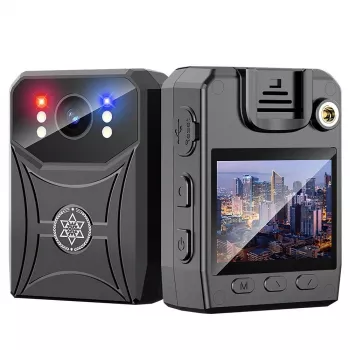
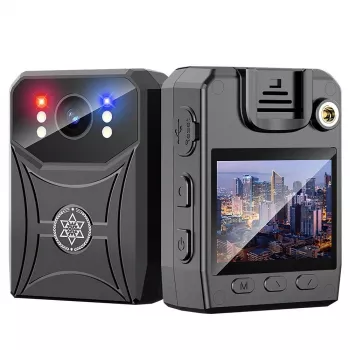
A compact WiFi-enabled mini camcorder designed for everyday recording and monitoring, combining 4K capture, infrared night vision, and motion-triggered recording for flexible use at home, on the go, or in the car. If you want a small camera that’s easy to place, quick to check from a phone (app-dependent), and practical for capturing short incidents instead of hours of idle footage, this style of mini camcorder fits the job well.
What This Mini Camcorder Is Built For
- Compact form factor for discreet placement on shelves, desks, or in vehicles
- 4K video capture for clearer faces, text, and scene details than standard HD
- IR night vision for low-light spaces like hallways, garages, and storage rooms
- Motion detection to reduce wasted footage and simplify review
- WiFi connectivity for live view and quick access to recordings (app-dependent)
For shoppers who want a straightforward, small-footprint setup, the Ultra HD 4K Mini WiFi Camcorder with IR Night Vision & Motion Detection is designed around practical placement and fast access—especially when you need to confirm what happened without digging through long clips.
Core Features That Matter Day to Day
- Ultra HD recording for more usable zoom when reviewing footage
- Motion-triggered recording to focus on events rather than continuous idle time
- Infrared illumination to help capture scenes when lights are off
- Mini size for flexible placement and travel-friendly use
- Works well for short clips, incident capture, and room monitoring
In daily use, the biggest benefit of 4K is clarity when you have to pause, zoom, or verify details (like a face angle, a package label, or whether a door fully closed). Motion-triggered clips also tend to be easier to review, because they’re segmented around activity instead of one long timeline.
Night Vision and Motion Detection: What to Expect
- IR night vision is best for near-to-mid range indoor coverage; reflective surfaces can cause glare
- Place the camera to avoid pointing directly at windows at night to reduce reflections
- Motion detection sensitivity often needs testing: too high can trigger on shadows; too low can miss slower movement
- For more reliable triggers, aim at entry paths (doorways, stairs) rather than wide open rooms
- Use consistent mounting to reduce false alerts from vibration (fans, traffic, slamming doors)
Night vision is most dependable when you treat it like a focused spotlight: it’s strongest where you want action to happen, not across an entire open-plan space. If you’re seeing hazy footage, try moving the camera slightly farther from glossy floors, mirrors, or picture frames that bounce IR light back into the lens.
WiFi Use: Live View, Notifications, and Playback
- WiFi enables faster previewing and transferring compared with removing storage media
- Live view is most stable when the camera and router have a strong signal and minimal interference
- If notifications are supported by the companion app, confirm background permissions on the phone
- For travel or vehicle use, confirm whether the camera is intended to connect to a home router or operate in a direct-connection mode
- Use a strong WiFi password and keep the controlling phone updated
For general device security and safer setup habits, it’s worth reviewing consumer IoT guidance from organizations like NIST and the FTC, especially if an app includes remote access features.
Video Quality, Storage, and Battery/Power Considerations
For a solid power option, consider pairing it with the 65W GaN USB C Fast Wall Charger with Quick Charge, especially when you need consistent power delivery for extended recording windows.
Setup and Placement Tips for Cleaner Footage
Quick Specs and Buying Checklist
At-a-Glance Checklist
| Item to Confirm |
Why It Matters |
Practical Tip |
| Night coverage area |
IR performance varies by distance and room reflectivity |
Test in complete darkness and reposition away from windows |
| Motion sensitivity |
Too sensitive creates noise; too low misses events |
Start medium, then adjust after a day of real activity |
| Power plan |
Long sessions typically need steady power |
Use a reliable fast wall charger for stable power delivery |
| WiFi strength |
Impacts live view and file access |
Place within strong router range or reduce interference |
| Privacy expectations |
Recording rules vary by location and scenario |
Post a notice in shared spaces when appropriate |
Privacy and Responsible Use
For wireless peace-of-mind and practical context, the FCC consumer guide offers a helpful overview of wireless devices and common concerns. The biggest day-to-day wins typically come from good access control: strong passwords, updated phones, and limiting who can log in.
Recommended Add-Ons From the Store
FAQ
Does night vision work in complete darkness?
Yes—IR night vision is designed for low-light and no-light scenes, but the usable range depends on distance, room surfaces, and placement. For best results, test in complete darkness and avoid aiming at windows or reflective objects that can cause glare.
Will motion detection record only when something moves?
Typically, yes: motion detection starts recording when the camera detects changes in the scene, but sensitivity settings affect how often it triggers. Aim the camera toward entry paths (like doorways or stairs) and keep it stable to reduce false triggers from vibration or shifting shadows.
Can it run continuously on wall power?
In many setups, continuous wall power is a common way to run longer monitoring sessions. Use a reliable charger and cable, keep the camera ventilated, and check occasionally for excess heat or a shifted mount that could affect the view.
Recommended for you









Leave a comment